Het nieuwe offline: hybride winkelen
Volgens Shopify’s 2023 Commerce Trends Report is het juist aan de lockdowns en beperkingen van de pandemie te danken dat klanten nu behoefte hebben aan een fysieke plek en een persoonlijke benadering om met jouw brand te connecten. Tegelijkertijd zijn ze gewend geraakt aan de snelheid en het gemak van online shoppen - en verwachten ze hetzelfde van je fysieke verkooppunt.
Bovendien hebben ze er geen enkele moeite mee om tussen verkoopkanalen te switchen. Ze zien iets leuks in je boetiek, kopen het toch niet, hebben daar spijt van zodra ze thuiskomen, en bestellen het nog even snel in je webshop voor het avondeten. Terwijl ze bestellen zien ze dat er nog meer kleuren zijn, en voegen hetzelfde item in een andere kleur toe aan hun winkelmandje. Als ze de volgende dag de bestelling in huis hebben houden ze een kleur, gaan terug naar je boetiek om de andere kleur te retourneren, maar ruilen het uiteindelijk om voor een ander item dat ze leuk vinden.
Om aan deze nieuwe verwachtingen en shop-gewoonten tegemoet te komen, moet je offline verkooppunt naadloos aansluiten op je online store. Hoe krijg je dat voor elkaar? Door Shopify POS te gebruiken: Shopify’s eigen point-of-sale app die je fysieke verkoopkanalen integreert met de rest van je bedrijf.
Wat is Shopify POS?
Een point-of-sale app is een app die je installeert op een mobiel apparaat (meestal een tablet, maar een smartphone werkt ook prima) waarmee je betalingen op locatie kunt ontvangen en beheren. Het kan heel veel betaalmethoden aan, inclusief contante betalingen, afhankelijk van welke hardware je erbij gebruikt (meestal een pinapparaat, soms ook een kassalade).
POS systemen (ook wel kassasystemen genoemd) worden al jaren gebruikt in de horeca. E-commerce platforms als Shopify hebben POS inmiddels ook omarmd, en investeren flink in het optimaliseren van deze systemen voor e-commerce merken met een fysiek verkooppunt. Het resultaat is Shopify POS: een goed doordachte POS met al het extreme gebruiksgemak waar Shopify bekend om staat.

De voordelen van Shopify POS
De grote plus van Shopify’s POS app is dat het je fysieke verkooplocatie integreert met je online store en je data voor alle kanalen op een plek bij elkaar brengt. Op die manier wordt je offline store gewoon een extra verkoopkanaal, en wordt al je activiteit daar vastgelegd in je Shopify account. Dit heeft verschillende voordelen:
- Je voorraad wordt gesynchroniseerd tussen je online en offline winkels, zodat je altijd weet wat er op voorraad is en waar. Je kunt voorraad levels bijhouden voor maar liefst 1000 locaties, afhankelijk van je Shopify plan.
- Klantdata wordt ook gesynchroniseerd tussen verkoopkanalen. Dit betekent dat je in-store klanten zonder account kunt vragen zich aan te melden, zodat je ze niet uit het zicht verliest. Ook heb je makkelijk toegang tot bestaande accounts - om bijvoorbeeld loyalty punten toe te kennen voor een aankoop die klanten in je fysieke winkel hebben gedaan, of een in-store retour af te handelen.
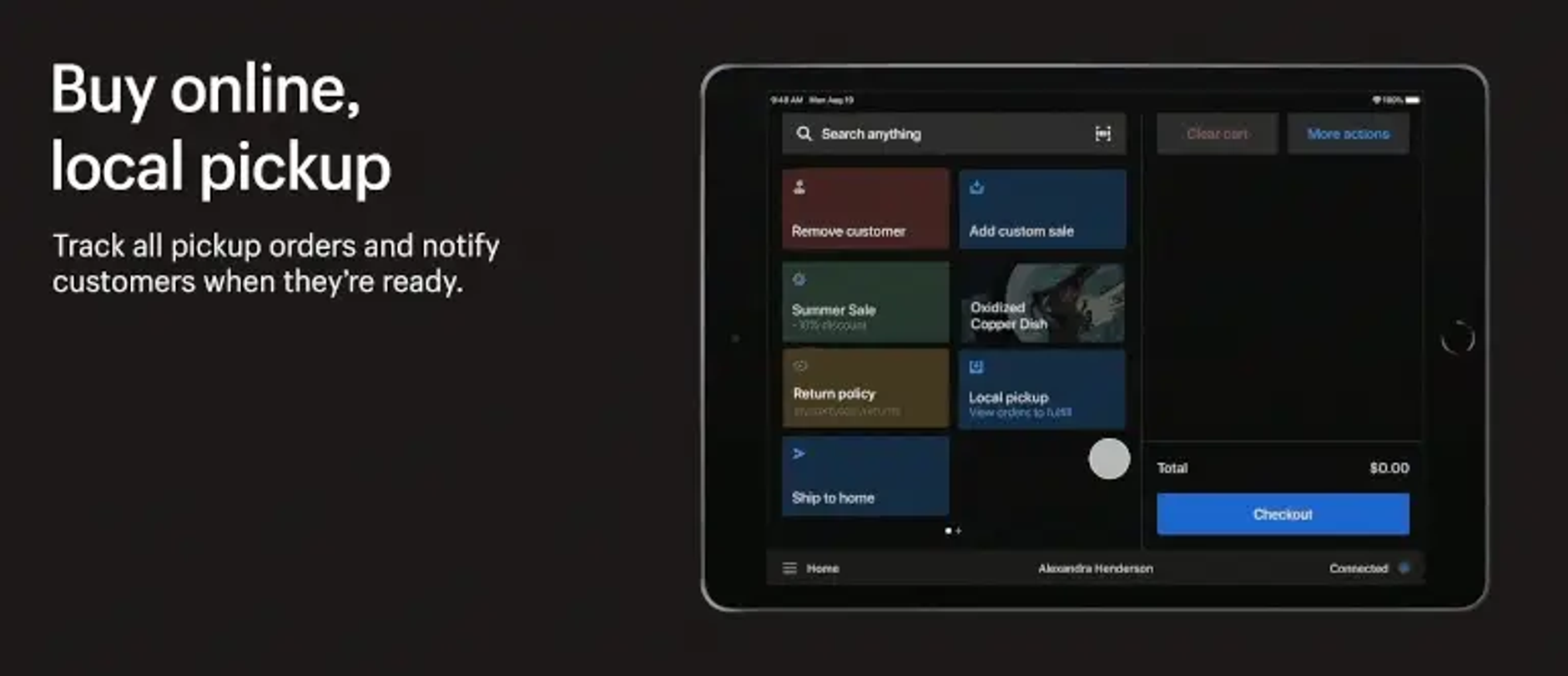
- De app geeft je instant toegang tot je bestsellers, kortingen, en veelgebruikte functies zoals een bon mailen. Zo ben je verzekerd van een soepele in-store klantervaring.
- Omnichannel shopping wordt heel erg makkelijk. Laat klanten in de winkel bestellen en stuur het op naar hun thuisadres (of andersom, heel populair tijdens COVID: online bestellen en in-store ophalen), bewaar hun in-store winkelmandje voor je klanten, maak het mogelijk om een online besteld item om te ruilen in je pop-up store, of om een in de winkel gekocht item per post te retourneren - alles kan!
- Krijg inzicht en overzicht in de resultaten van al je POS locaties via sales reports, cash(flow) tracking, product reports en meer. Dit helpt je om trends in je bedrijf te herkennen en erop te anticiperen.
Wat kost Shopify POS?
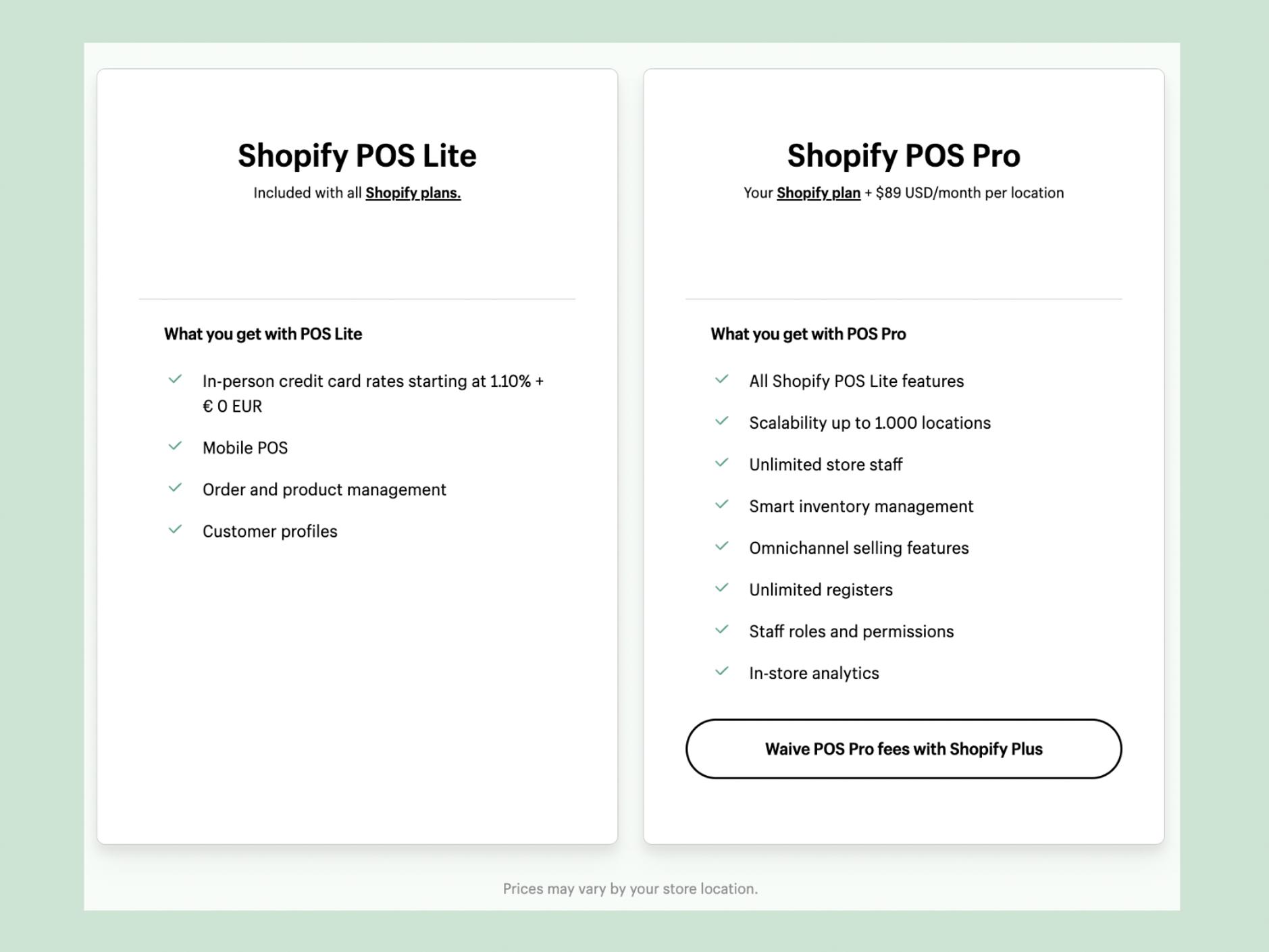
Shopify POS komt in twee smaken: Lite en Pro. POS Lite is gratis voor alle Shopify gebruikers en geeft je de basics voor verkopen op locatie. Het is geoptimaliseerd voor merchants die af en toe producten verkopen op markten, in pop-up stores en tijdens evenementen. Je kunt er nieuwe klanten mee registreren, bonnen versturen via email, retouren beheren, kortingen verrekenen en nuttige inzichten krijgen via gedetailleerde rapportages. Afhankelijk van je merk kan Shopify Lite tot 4 fysieke verkooppunten bedienen.
POS Pro is gratis voor Shopify Plus gebruikers en heeft wat meer power. Voor niet-Plus-gebruikers kost Shopify POS Pro $89 per maand. POS Pro is wat je nodig hebt als je merk tot 50 (internationale) fysieke winkels heeft, met vaste verkoopmedewerkers. Met POS Pro kun je een ongelimiteerd aantal medewerkers accounts aanmaken, met elk hun eigen autorisaties. Het maakt in-store pickup van online bestellingen mogelijk, evenals ruilingen en retouren. Pro biedt meer customization opties voor de layout van je bonnen dan Lite, integreert met apps zoals LoyaltyLion (je kunt het zelfs koppelen aan een fysieke loyalty card), en nog veel meer.
Zo zet je Shopify POS op voor je winkel
Shopify POS opzetten is simpel. Voor je begint moet je wat hardware aanschaffen die je bij Shopify kunt kopen of bij een andere partij van jouw keuze:
- Een kaartlezer/betaalautomaat (of meerdere, afhankelijk van wat je nodig hebt)
- Een relatief recente smartphone of tablet (of meerdere) om de Shopify POS app op te installeren (houd er rekening mee dat de app niet werkt op een desktop of laptop!)
- Optioneel: een barcode scanner om makkelijk producten te registreren (kies er een die Shopify aanbeveelt)
- Optioneel: een kassalade, om veilig contante betalingen te kunnen accepteren
- Optioneel: een bonnenprinter (let op: eentje voor elke POS!)
Daarna installeer je de POS app op je mobiele apparaat, en loopt de rest van de setup door. De app synchroniseert automatisch je product catalogus, klant accounts, eventuele kortingen en cadeaukaarten die je hebt aangemaakt, en alles wat je verder nodig hebt.
N.B.: In de toekomst wordt het opzetten van POS mogelijk nog simpeler, wanneer POS Go uitgerold wordt in Europa. POS Go is een handheld apparaat met POS erop geïnstalleerd dat de functies van een kaartlezer en een mobiel combineert.
Geïnteresseerd? Plan een Shopify POS demo met The new offline: hybrid shopping
According to Shopify’s 2023 Commerce Trends Report, it’s precisely because of the lockdowns and restrictions of the pandemic that customers now crave a physical space and a personal approach to connect with your brand. At the same time, they have gotten used to the speed and ease of online shopping - and expect the same from your physical store.
What is more, today’s consumers think nothing of jumping between channels. They see something they like in your brick-and-mortar store, don’t buy it, regret that decision as soon as they get home and then decide to order it in your webshop, quickly before dinner starts. Spotting additional colours in the webshop, they add the same item in a different colour to their cart. Receiving the order the next day they keep one colour, intend to return the other in-store, and while there decide to exchange it for another item they like.
To cater to these emerging expectations and shopping habits, your offline store needs to blend seamlessly with your online store. How do you achieve that? By using Shopify POS: Shopify’s own point-of-sale app that integrates your physical sales channels with the rest of your business.
What is Shopify POS?
A point-of-sale app is an app you install on any mobile device (usually a tablet, but a smartphone works fine too) with which you can receive and manage payments in person. It can handle many payment methods, including cash, depending on the hardware you connect (usually a payment terminal, sometimes also a cash drawer).
POS systems are currently widely used in restaurants and cafes. In recent years, platforms like Shopify have also embraced POS systems and invested a lot in optimising them for e-commerce brands with an offline presence. The result is Shopify POS: a sophisticated POS with all the extreme user friendliness that Shopify is known for.
The advantages of Shopify POS
The big plus of Shopify’s POS app is that it connects your physical outlet to your online store and centralises your data across sales channels. This way, your offline outlet becomes just another sales channel and all activity there is logged in your Shopify account. This has several advantages:
- Your inventory is synchronised between your online and offline stores, so you always know what you have in stock, and where it is located. You can monitor stock levels for up to 1000 locations, depending on your Shopify plan.
- Client data is synchronised across channels as well. This means you can register customers when they buy in-store so you don’t lose sight of them, or easily access a customer’s existing account - to add loyalty points for a purchase they made in person, for instance, or manage an in-store return.
- The app makes it easy to access your bestsellers, discounts, and often-used features such as emailing a receipt, to ensure a smooth in-house experience.
- Omnichannel shopping becomes very easy. Allow customers to order in-store and have it delivered to their home (or the other way around, which was very popular during COVID: order and pay online and pick up in-store), have them exchange an online order in your pop-up store, save their in-store cart for them, or allow them to return an item by mail that they bought in-store.
- Data reporting through sales reports, cash(flow) tracking, product reports and more across all points of sale that will help you understand trends within your business and adapt.
What does Shopify POS cost?
Shopify POS comes in two flavours: Lite and Pro. POS Lite is free for all Shopify users and gives you the basics for selling in person. It is optimised for merchants who occasionally sell products at markets, in pop-up stores and at events, allowing them to register new customers, send receipts by email, manage returns, offer discounts and get useful business insights via specialised reports. Depending on your brand, Lite can accommodate up to 4 physical outlets.
POS Pro is free for Shopify Plus users and packs a bit more punch. For non-Plus-users, Shopify POS Pro comes at a fee of $89 a month. POS Pro is what you need when your brand has up to 50 (international) physical stores, with hired staff. POS Pro allows you to set up an unlimited number of staff accounts, each with different permissions. It also enables in-store pickup of online orders, product exchanges as well as returns, more customization options for your receipts than Lite offers, integration with apps like LoyaltyLion (you can even couple it to a physical loyalty card), and much more.
How to set up Shopify POS for your store
Setting up Shopify POS is easy. You will need some hardware which you can buy either with Shopify or with another party of your choice:
- A card reader/payment terminal (or several, depending on your outlet)
- A relatively recent mobile device (or several) to install the Shopify POS app on (note that the app doesn’t work on a laptop or desktop!)
- Optional: a barcode scanner for easy registration of products (choose the one Shopify recommends)
- Optional: a cash drawer, to safely accept cash payments
- Optional: a printer for receipts (mind you: 1 for each POS!)
Next, you simply install the POS app on your mobile device, and it will take you through the rest of the setup. The app will automatically sync your product catalogue, customer accounts, any discounts and gift cards you set up, and anything else you need.
N.B.: In the future, setting up your POS system might become even easier when POS Go is rolled out in Europe. POS Go is a handheld device with POS installed that combines the functions of a card reader and a mobile phone.
Interested? Plan a Shopify POS demo with Domaine Europe
Want to invest in a physical space where customers can connect to your brand in person? Domaine Europe helped brands like PADELSTORE.com and Douxe set up Shopify POS and we are happy to help you go offline as well ;) We’ll set up your chain of brick-and-mortar stores, integrate your POS with any other systems you use, build custom functionality where you need it, and offer you our expertise on selling on location.
Wil jij investeren in een fysieke ruimte waar je klanten persoonlijk met je in contact kunnen komen? The new offline: hybrid shopping
According to Shopify’s 2023 Commerce Trends Report, it’s precisely because of the lockdowns and restrictions of the pandemic that customers now crave a physical space and a personal approach to connect with your brand. At the same time, they have gotten used to the speed and ease of online shopping - and expect the same from your physical store.
What is more, today’s consumers think nothing of jumping between channels. They see something they like in your brick-and-mortar store, don’t buy it, regret that decision as soon as they get home and then decide to order it in your webshop, quickly before dinner starts. Spotting additional colours in the webshop, they add the same item in a different colour to their cart. Receiving the order the next day they keep one colour, intend to return the other in-store, and while there decide to exchange it for another item they like.
To cater to these emerging expectations and shopping habits, your offline store needs to blend seamlessly with your online store. How do you achieve that? By using Shopify POS: Shopify’s own point-of-sale app that integrates your physical sales channels with the rest of your business.
What is Shopify POS?
A point-of-sale app is an app you install on any mobile device (usually a tablet, but a smartphone works fine too) with which you can receive and manage payments in person. It can handle many payment methods, including cash, depending on the hardware you connect (usually a payment terminal, sometimes also a cash drawer).
POS systems are currently widely used in restaurants and cafes. In recent years, platforms like Shopify have also embraced POS systems and invested a lot in optimising them for e-commerce brands with an offline presence. The result is Shopify POS: a sophisticated POS with all the extreme user friendliness that Shopify is known for.
The advantages of Shopify POS
The big plus of Shopify’s POS app is that it connects your physical outlet to your online store and centralises your data across sales channels. This way, your offline outlet becomes just another sales channel and all activity there is logged in your Shopify account. This has several advantages:
- Your inventory is synchronised between your online and offline stores, so you always know what you have in stock, and where it is located. You can monitor stock levels for up to 1000 locations, depending on your Shopify plan.
- Client data is synchronised across channels as well. This means you can register customers when they buy in-store so you don’t lose sight of them, or easily access a customer’s existing account - to add loyalty points for a purchase they made in person, for instance, or manage an in-store return.
- The app makes it easy to access your bestsellers, discounts, and often-used features such as emailing a receipt, to ensure a smooth in-house experience.
- Omnichannel shopping becomes very easy. Allow customers to order in-store and have it delivered to their home (or the other way around, which was very popular during COVID: order and pay online and pick up in-store), have them exchange an online order in your pop-up store, save their in-store cart for them, or allow them to return an item by mail that they bought in-store.
- Data reporting through sales reports, cash(flow) tracking, product reports and more across all points of sale that will help you understand trends within your business and adapt.
What does Shopify POS cost?
Shopify POS comes in two flavours: Lite and Pro. POS Lite is free for all Shopify users and gives you the basics for selling in person. It is optimised for merchants who occasionally sell products at markets, in pop-up stores and at events, allowing them to register new customers, send receipts by email, manage returns, offer discounts and get useful business insights via specialised reports. Depending on your brand, Lite can accommodate up to 4 physical outlets.
POS Pro is free for Shopify Plus users and packs a bit more punch. For non-Plus-users, Shopify POS Pro comes at a fee of $89 a month. POS Pro is what you need when your brand has up to 50 (international) physical stores, with hired staff. POS Pro allows you to set up an unlimited number of staff accounts, each with different permissions. It also enables in-store pickup of online orders, product exchanges as well as returns, more customization options for your receipts than Lite offers, integration with apps like LoyaltyLion (you can even couple it to a physical loyalty card), and much more.
How to set up Shopify POS for your store
Setting up Shopify POS is easy. You will need some hardware which you can buy either with Shopify or with another party of your choice:
- A card reader/payment terminal (or several, depending on your outlet)
- A relatively recent mobile device (or several) to install the Shopify POS app on (note that the app doesn’t work on a laptop or desktop!)
- Optional: a barcode scanner for easy registration of products (choose the one Shopify recommends)
- Optional: a cash drawer, to safely accept cash payments
- Optional: a printer for receipts (mind you: 1 for each POS!)
Next, you simply install the POS app on your mobile device, and it will take you through the rest of the setup. The app will automatically sync your product catalogue, customer accounts, any discounts and gift cards you set up, and anything else you need.
N.B.: In the future, setting up your POS system might become even easier when POS Go is rolled out in Europe. POS Go is a handheld device with POS installed that combines the functions of a card reader and a mobile phone.
Interested? Plan a Shopify POS demo with Domaine Europe
Want to invest in a physical space where customers can connect to your brand in person? Domaine Europe helped brands like PADELSTORE.com and Douxe set up Shopify POS and we are happy to help you go offline as well ;) We’ll set up your chain of brick-and-mortar stores, integrate your POS with any other systems you use, build custom functionality where you need it, and offer you our expertise on selling on location. heeft recent nog merken als PADELSTORE.com en Douxe geholpen om Shopify POS op te zetten, en we helpen jouw store ook graag om offline te gaan ;) Wij richten de software voor je keten van fysieke winkels in, integreren je POS met de andere systemen die je gebruikt, bouwen custom functionaliteit waar je die nodig hebt, en je mag vrij gebruik maken van onze ruime ervaring met verkopen op locatie.