The New Offline: Hybrides Shopping
Laut Shopify Commerce Trends Report 2023 wünschen sich Kundinnen und Kunden gerade wegen der Schließungen und Beschränkungen in den letzten Jahren einen physischen Ort und den persönlichen Kontakt mit Ihrer Marke. Gleichzeitig haben sie sich an die Schnelligkeit und Einfachheit des Online-Shoppings gewöhnt – und erwarten das auch von Ihrem physischen Geschäft.
Darüber hinaus haben Verbraucher nichts dagegen, zwischen den Kanälen zu wechseln. Nehmen wir an, eine Kundin entdeckt etwas in Ihrem Laden, das ihr zwar gefällt, sie jedoch vorerst nicht kauft. Zu Hause angekommen, bereut sie diese Entscheidung und bestellt es kurzerhand in Ihrem Onlineshop. Dort sieht sie den Artikel auch in weiteren Farben und bestellt schließlich zwei verschiedene Farbvarianten. Nach Erhalt ihrer Bestellung möchte sie eine Farbe behalten und die andere in Ihrem physischen Laden zurückgeben und gegen einen anderen Artikel umtauschen.
Um diesen neuen Erwartungen und Kaufgewohnheiten gerecht zu werden, muss Ihr Offline-Store nahtlos mit Ihrem Onlineshop verschmelzen. Und das erreichen Sie, indem Sie Shopify POS verwenden: Die Point-of-Sale-App von Shopify verbindet Ihre physischen Verkaufskanäle mit dem Rest Ihres Unternehmens.
Was ist Shopify POS?
Generell gesprochen ist eine Point-of-Sale-App eine App, die Sie auf einem beliebigen mobilen Gerät (in der Regel ein Tablet, ein Smartphone funktioniert auch) installieren und mit der Sie Zahlungen persönlich entgegennehmen und verwalten können. Sie kann je nach angeschlossener Hardware (in der Regel ein Zahlungsterminal, manchmal auch eine Kassenschublade) viele Zahlungsarten, einschließlich Bargeld, verarbeiten.
POS-Systeme sind derzeit vor allem in der Gastronomie weit verbreitet. In den letzten Jahren haben sich auch Plattformen wie Shopify der POS-Systeme angenommen und in deren Optimierung für E-Commerce-Marken mit Offline-Präsenz investiert. Das Ergebnis ist Shopify POS: ein ausgeklügeltes Kassensystem, das – wie von Shopify gewohnt – besonders benutzerfreundlich ist.

Die Vorteile von Shopify POS
Der große Vorteil der POS-App von Shopify ist, dass sie Ihr physisches Geschäft mit Ihrem Online-Shop verbindet und Ihre Daten über alle Verkaufskanäle hinweg zentralisiert. Auf diese Weise wird Ihre Offline-Filiale zu einem weiteren Verkaufskanal – und alle Aktivitäten dort werden in Ihrem Shopify-Konto protokolliert. Das hat mehrere Vorteile:
- Ihr Lagerbestand wird zwischen Ihren Online- und Offline-Shops synchronisiert, sodass Sie immer wissen, welche Artikel Sie auf Lager haben und wo sie sich befinden. Je nach Shopify Abo können Sie die Lagerbestände für bis zu 1000 Standorte kontrollieren.
- Auch die Kundendaten werden kanalübergreifend synchronisiert. Das bedeutet, dass Sie Kunden im Geschäft registrieren können, sodass Sie sie nicht aus den Augen verlieren. Sie können auch ganz einfach auf ein bestehendes Kundenkonto zugreifen, um beispielsweise Treuepunkte für einen persönlich getätigten Kauf zu sammeln oder eine Rückgabe im Geschäft zu verwalten.
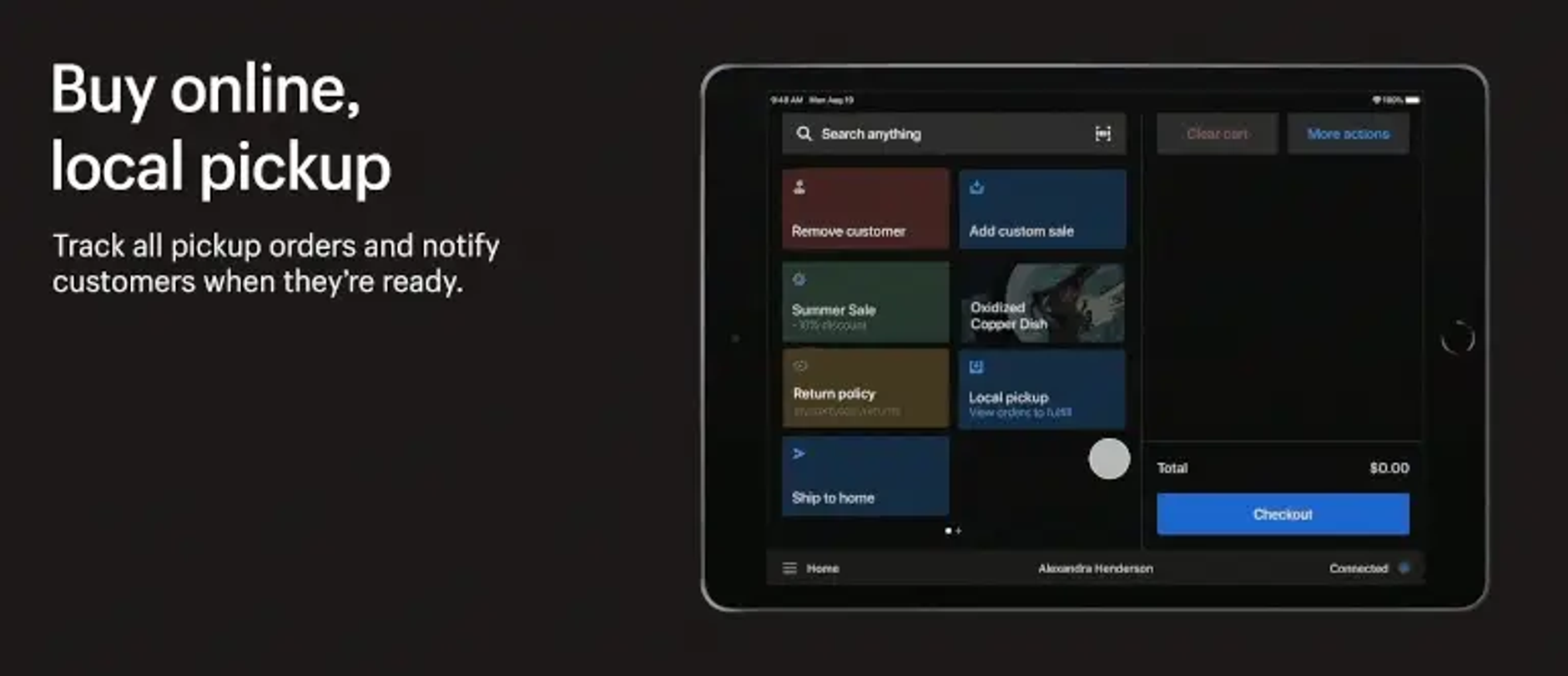
- Die App erleichtert den Zugang zu Ihren Bestsellern, Rabatten und häufig genutzten Funktionen (wie z. B. das Versenden eines Belegs per E-Mail), um einen reibungslosen internen Ablauf zu gewährleisten.
- Omnichannel-Shopping wird ganz einfach. Ihre Kunden können im Geschäft bestellen und sich die Ware nach Hause liefern lassen (oder umgekehrt), eine Online-Bestellung in Ihrem Pop-up-Store umtauschen, einen offline erworbenen Artikel zurücksenden und Sie können ihren Einkaufswagen im Geschäft für sie speichern.
- Sie erhalten Datenberichte durch Umsatzberichte, Cash(flow)-Verfolgung, Produktberichte und mehr über alle Verkaufsstellen hinweg, die Ihnen helfen, Trends in Ihrem Geschäft zu erkennen und sich anzupassen.
Was kostet Shopify POS?
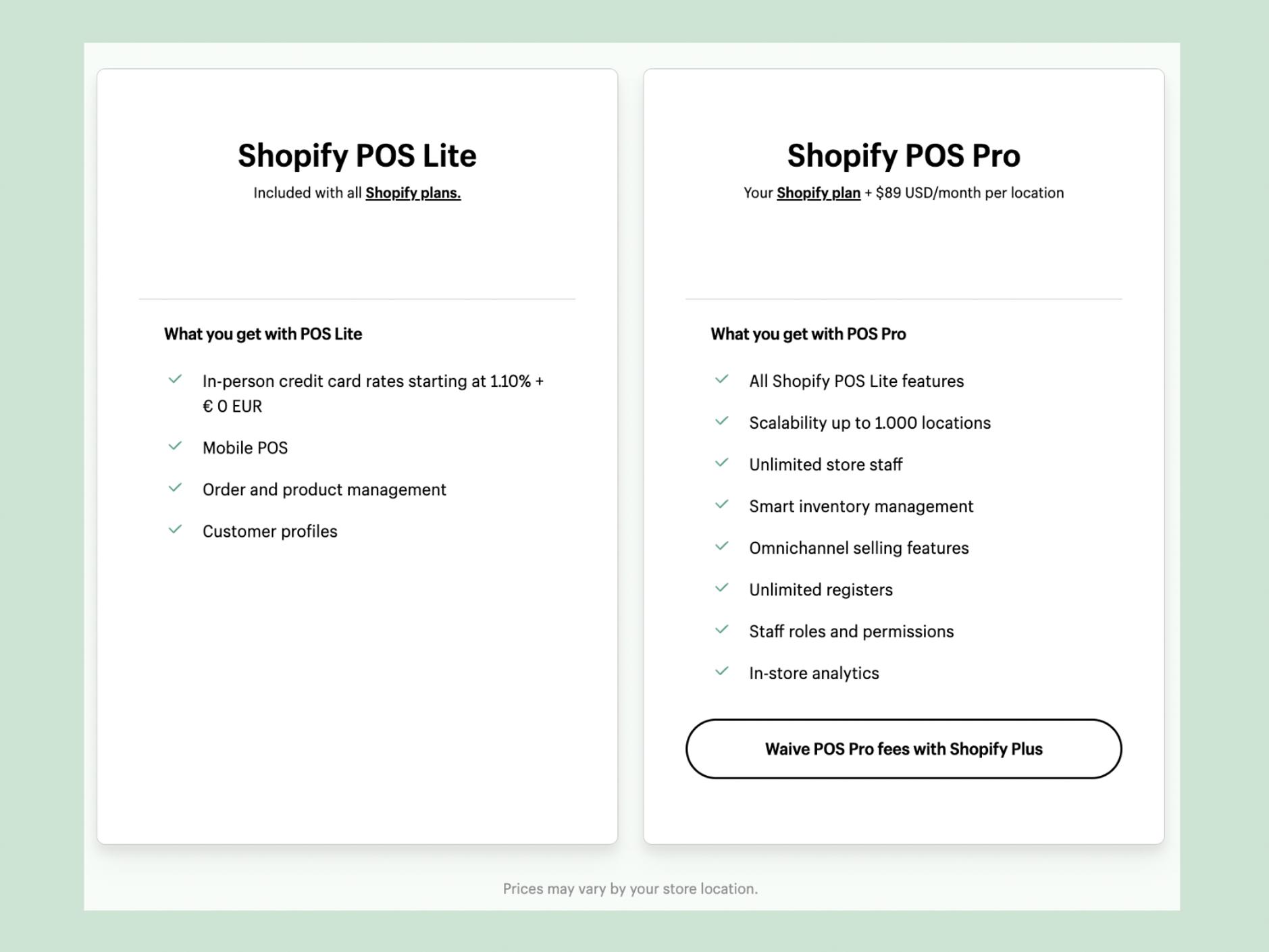
Shopify POS gibt es in zwei Varianten: Lite und Pro. POS Lite ist für alle Shopify-Nutzer kostenlos und bietet Ihnen die Grundlagen für den persönlichen Verkauf. Es wurde für Händler konzipiert, die gelegentlich Produkte auf Märkten, in Pop-up-Stores und bei Veranstaltungen verkaufen. Lite ermöglicht Ihnen, neue Kunden zu registrieren, Quittungen per E-Mail zu versenden, Retouren zu verwalten, Rabatte anzubieten und über spezifische Berichte wertvolle Geschäftseinblicke zu erhalten. Abhängig von Ihrer Marke kann Lite bis zu vier physische Verkaufsstellen aufnehmen.
POS Pro ist für Benutzer von Shopify Plus kostenlos und bietet etwas mehr Leistung. Für alle, die Shopify Plus nicht nutzen, kostet Shopify POS Pro $89 im Monat. Sie benötigen POS Pro, wenn Ihre Marke bis zu 50 (internationale) physische Läden mit angestelltem Personal hat. Mit POS Pro können Sie eine unbegrenzte Anzahl von Mitarbeiterkonten einrichten, die jeweils über unterschiedliche Berechtigungen verfügen. Außerdem bietet POS Pro die Abholung von Online-Bestellungen im Geschäft, den Umtausch von Produkten sowie Rücksendungen, mehr Anpassungsoptionen für Ihre Quittungen, die Integration mit Apps wie LoyaltyLion (Sie können es sogar mit einer physischen Treuekarte koppeln) und vieles mehr.
Wie Sie Shopify POS für Ihr Geschäft einrichten
Die Einrichtung von Shopify POS ist einfach. Sie benötigen Hardware, die Sie entweder bei Shopify oder bei einem anderen Anbieter Ihrer Wahl kaufen können:
- Ein Kartenlesegerät/Zahlungsterminal (oder mehrere)
- Ein relativ aktuelles Mobilgerät (oder mehrere), auf dem Sie die Shopify POS-App installieren können (beachten Sie, dass die App nicht auf einem Laptop oder Desktop funktioniert!)
- Optional: einen Barcode-Scanner für die einfache Registrierung von Produkten (wählen Sie den von Shopify empfohlenen Scanner)
- Optional: eine Kassenschublade für sichere Barzahlungen
- Optional: ein Drucker für Quittungen (wohlgemerkt: einen für jede Kasse!)
Als Nächstes installieren Sie einfach die POS-App auf Ihrem Mobilgerät, die Sie dann durch die nächsten Schritte führt. Die App synchronisiert automatisch Ihren Produktkatalog, Ihre Kundenkonten, alle Rabatte und Geschenkkarten, die Sie eingerichtet haben, und alles andere, was Sie brauchen.
In Zukunft könnte die Einrichtung Ihres Kassensystems noch einfacher werden, wenn POS Go in Europa auf den Markt kommt. POS Go ist ein Handgerät mit installiertem POS, das die Funktionen eines Kartenlesegeräts und eines Mobiltelefons kombiniert.
Interessiert? Buchen Sie eine Shopify POS Demo mit The new offline: hybrid shopping
According to Shopify’s 2023 Commerce Trends Report, it’s precisely because of the lockdowns and restrictions of the pandemic that customers now crave a physical space and a personal approach to connect with your brand. At the same time, they have gotten used to the speed and ease of online shopping - and expect the same from your physical store.
What is more, today’s consumers think nothing of jumping between channels. They see something they like in your brick-and-mortar store, don’t buy it, regret that decision as soon as they get home and then decide to order it in your webshop, quickly before dinner starts. Spotting additional colours in the webshop, they add the same item in a different colour to their cart. Receiving the order the next day they keep one colour, intend to return the other in-store, and while there decide to exchange it for another item they like.
To cater to these emerging expectations and shopping habits, your offline store needs to blend seamlessly with your online store. How do you achieve that? By using Shopify POS: Shopify’s own point-of-sale app that integrates your physical sales channels with the rest of your business.
What is Shopify POS?
A point-of-sale app is an app you install on any mobile device (usually a tablet, but a smartphone works fine too) with which you can receive and manage payments in person. It can handle many payment methods, including cash, depending on the hardware you connect (usually a payment terminal, sometimes also a cash drawer).
POS systems are currently widely used in restaurants and cafes. In recent years, platforms like Shopify have also embraced POS systems and invested a lot in optimising them for e-commerce brands with an offline presence. The result is Shopify POS: a sophisticated POS with all the extreme user friendliness that Shopify is known for.
The advantages of Shopify POS
The big plus of Shopify’s POS app is that it connects your physical outlet to your online store and centralises your data across sales channels. This way, your offline outlet becomes just another sales channel and all activity there is logged in your Shopify account. This has several advantages:
- Your inventory is synchronised between your online and offline stores, so you always know what you have in stock, and where it is located. You can monitor stock levels for up to 1000 locations, depending on your Shopify plan.
- Client data is synchronised across channels as well. This means you can register customers when they buy in-store so you don’t lose sight of them, or easily access a customer’s existing account - to add loyalty points for a purchase they made in person, for instance, or manage an in-store return.
- The app makes it easy to access your bestsellers, discounts, and often-used features such as emailing a receipt, to ensure a smooth in-house experience.
- Omnichannel shopping becomes very easy. Allow customers to order in-store and have it delivered to their home (or the other way around, which was very popular during COVID: order and pay online and pick up in-store), have them exchange an online order in your pop-up store, save their in-store cart for them, or allow them to return an item by mail that they bought in-store.
- Data reporting through sales reports, cash(flow) tracking, product reports and more across all points of sale that will help you understand trends within your business and adapt.
What does Shopify POS cost?
Shopify POS comes in two flavours: Lite and Pro. POS Lite is free for all Shopify users and gives you the basics for selling in person. It is optimised for merchants who occasionally sell products at markets, in pop-up stores and at events, allowing them to register new customers, send receipts by email, manage returns, offer discounts and get useful business insights via specialised reports. Depending on your brand, Lite can accommodate up to 4 physical outlets.
POS Pro is free for Shopify Plus users and packs a bit more punch. For non-Plus-users, Shopify POS Pro comes at a fee of $89 a month. POS Pro is what you need when your brand has up to 50 (international) physical stores, with hired staff. POS Pro allows you to set up an unlimited number of staff accounts, each with different permissions. It also enables in-store pickup of online orders, product exchanges as well as returns, more customization options for your receipts than Lite offers, integration with apps like LoyaltyLion (you can even couple it to a physical loyalty card), and much more.
How to set up Shopify POS for your store
Setting up Shopify POS is easy. You will need some hardware which you can buy either with Shopify or with another party of your choice:
- A card reader/payment terminal (or several, depending on your outlet)
- A relatively recent mobile device (or several) to install the Shopify POS app on (note that the app doesn’t work on a laptop or desktop!)
- Optional: a barcode scanner for easy registration of products (choose the one Shopify recommends)
- Optional: a cash drawer, to safely accept cash payments
- Optional: a printer for receipts (mind you: 1 for each POS!)
Next, you simply install the POS app on your mobile device, and it will take you through the rest of the setup. The app will automatically sync your product catalogue, customer accounts, any discounts and gift cards you set up, and anything else you need.
N.B.: In the future, setting up your POS system might become even easier when POS Go is rolled out in Europe. POS Go is a handheld device with POS installed that combines the functions of a card reader and a mobile phone.
Interested? Plan a Shopify POS demo with Domaine Europe
Want to invest in a physical space where customers can connect to your brand in person? Domaine Europe helped brands like PADELSTORE.com and Douxe set up Shopify POS and we are happy to help you go offline as well ;) We’ll set up your chain of brick-and-mortar stores, integrate your POS with any other systems you use, build custom functionality where you need it, and offer you our expertise on selling on location.
Möchten Sie in Ihr Offline-Geschäft investieren, in dem Kunden persönlich mit Ihrer Marke in Kontakt treten können? The new offline: hybrid shopping
According to Shopify’s 2023 Commerce Trends Report, it’s precisely because of the lockdowns and restrictions of the pandemic that customers now crave a physical space and a personal approach to connect with your brand. At the same time, they have gotten used to the speed and ease of online shopping - and expect the same from your physical store.
What is more, today’s consumers think nothing of jumping between channels. They see something they like in your brick-and-mortar store, don’t buy it, regret that decision as soon as they get home and then decide to order it in your webshop, quickly before dinner starts. Spotting additional colours in the webshop, they add the same item in a different colour to their cart. Receiving the order the next day they keep one colour, intend to return the other in-store, and while there decide to exchange it for another item they like.
To cater to these emerging expectations and shopping habits, your offline store needs to blend seamlessly with your online store. How do you achieve that? By using Shopify POS: Shopify’s own point-of-sale app that integrates your physical sales channels with the rest of your business.
What is Shopify POS?
A point-of-sale app is an app you install on any mobile device (usually a tablet, but a smartphone works fine too) with which you can receive and manage payments in person. It can handle many payment methods, including cash, depending on the hardware you connect (usually a payment terminal, sometimes also a cash drawer).
POS systems are currently widely used in restaurants and cafes. In recent years, platforms like Shopify have also embraced POS systems and invested a lot in optimising them for e-commerce brands with an offline presence. The result is Shopify POS: a sophisticated POS with all the extreme user friendliness that Shopify is known for.
The advantages of Shopify POS
The big plus of Shopify’s POS app is that it connects your physical outlet to your online store and centralises your data across sales channels. This way, your offline outlet becomes just another sales channel and all activity there is logged in your Shopify account. This has several advantages:
- Your inventory is synchronised between your online and offline stores, so you always know what you have in stock, and where it is located. You can monitor stock levels for up to 1000 locations, depending on your Shopify plan.
- Client data is synchronised across channels as well. This means you can register customers when they buy in-store so you don’t lose sight of them, or easily access a customer’s existing account - to add loyalty points for a purchase they made in person, for instance, or manage an in-store return.
- The app makes it easy to access your bestsellers, discounts, and often-used features such as emailing a receipt, to ensure a smooth in-house experience.
- Omnichannel shopping becomes very easy. Allow customers to order in-store and have it delivered to their home (or the other way around, which was very popular during COVID: order and pay online and pick up in-store), have them exchange an online order in your pop-up store, save their in-store cart for them, or allow them to return an item by mail that they bought in-store.
- Data reporting through sales reports, cash(flow) tracking, product reports and more across all points of sale that will help you understand trends within your business and adapt.
What does Shopify POS cost?
Shopify POS comes in two flavours: Lite and Pro. POS Lite is free for all Shopify users and gives you the basics for selling in person. It is optimised for merchants who occasionally sell products at markets, in pop-up stores and at events, allowing them to register new customers, send receipts by email, manage returns, offer discounts and get useful business insights via specialised reports. Depending on your brand, Lite can accommodate up to 4 physical outlets.
POS Pro is free for Shopify Plus users and packs a bit more punch. For non-Plus-users, Shopify POS Pro comes at a fee of $89 a month. POS Pro is what you need when your brand has up to 50 (international) physical stores, with hired staff. POS Pro allows you to set up an unlimited number of staff accounts, each with different permissions. It also enables in-store pickup of online orders, product exchanges as well as returns, more customization options for your receipts than Lite offers, integration with apps like LoyaltyLion (you can even couple it to a physical loyalty card), and much more.
How to set up Shopify POS for your store
Setting up Shopify POS is easy. You will need some hardware which you can buy either with Shopify or with another party of your choice:
- A card reader/payment terminal (or several, depending on your outlet)
- A relatively recent mobile device (or several) to install the Shopify POS app on (note that the app doesn’t work on a laptop or desktop!)
- Optional: a barcode scanner for easy registration of products (choose the one Shopify recommends)
- Optional: a cash drawer, to safely accept cash payments
- Optional: a printer for receipts (mind you: 1 for each POS!)
Next, you simply install the POS app on your mobile device, and it will take you through the rest of the setup. The app will automatically sync your product catalogue, customer accounts, any discounts and gift cards you set up, and anything else you need.
N.B.: In the future, setting up your POS system might become even easier when POS Go is rolled out in Europe. POS Go is a handheld device with POS installed that combines the functions of a card reader and a mobile phone.
Interested? Plan a Shopify POS demo with Domaine Europe
Want to invest in a physical space where customers can connect to your brand in person? Domaine Europe helped brands like PADELSTORE.com and Douxe set up Shopify POS and we are happy to help you go offline as well ;) We’ll set up your chain of brick-and-mortar stores, integrate your POS with any other systems you use, build custom functionality where you need it, and offer you our expertise on selling on location. hat Marken wie PADELSTORE.com und Douxe bei der Einrichtung von Shopify POS geholfen, und wir unterstützen auch Sie gerne dabei, offline zu gehen. Wir richten Ihre Filialen ein, integrieren Ihr POS-System mit allen anderen Systemen, die Sie verwenden, bauen individuelle Funktionen auf und bieten Ihnen unser Fachwissen über den Verkauf vor Ort.